
AutoCorrect Switch
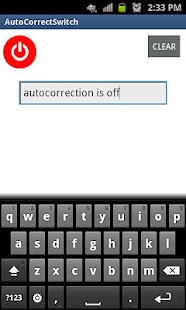
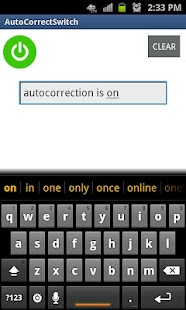
AutoCorrect switch is an app exclusively built to provide easy access to enable and disable the autocorrection (prediction) option provided on an as needed basis, without going back and forth changing your keyboard settings.There are times when you might need the autocorrect feature and there are times when you don’t.
Simply logon to our app and start typing what you want.
Turn on or off the Autocorrect switch as many times as you want.
After you are done typing simply select the option of where you want to post it.In the Auto-correct Switch app from your menu key on your phone, you will be able to share the message as an email or Message.
You can also copy the message and then paste it into any app or document.Now you can be in control of what you share and forget the annoying suggestions that autocorrection feature gives you while you are typing your messages or notes.
Note: This app works in combination with the prediction feature of your phone.
Make sure this feature is ON by going into settings>language & keyboard>touch input>Text input>prediction
Features:Turn Off or On AutoCorrect in One Place.Compose in one central place to send via email or message.Create Notes and export them to apps like Evernote.
Benefits and uses:Convenience of staying in one place and having control over the auto correction feature through the switch.
Key once without having to switch applications for the same message improving efficiency.Turn OFF AutoCorrect to prevent miscommunication and avoid embarrassment by knowing that what you send is exactly what you type.Extremely useful for bilingual people who type messages in both languages using one type of keyboard.
For example, type Spanish in English keyboard without getting suggestions for English words
About AutoCorrect Switch
- Package name (App ID)
- autocorrect.switchit
- Available on
- Google Play
- Price
- Free
- Version
- v1.2
Looking for the AutoCorrect Switch APK?
The safest way to get AutoCorrect Switch (autocorrect.switchit) on your Android device is to install it directly from Google Play — you'll always get the latest official version, automatic updates, and no risk of modified or infected APK files from third-party sites.
Social Features
Connect and share with friends and the community.
Food & Dining
Discover recipes and order food from your favorite restaurants.
News & Updates
Stay informed with the latest news and updates.
See AutoCorrect Switch in Action
Frequently Asked Questions
Is AutoCorrect Switch free?
Yes, AutoCorrect Switch is free to download and install on Android through Google Play.
How do I install AutoCorrect Switch on Android?
Open Google Play on your Android phone or tablet, search for AutoCorrect Switch or tap the Google Play button on this page, then tap Install. The app downloads and installs automatically.
What is autocorrect.switchit?
autocorrect.switchit is the App ID (package name) of AutoCorrect Switch on Google Play. Every Android app has a unique package name, and it is the safest way to verify you are installing the official app.
Is AutoCorrect Switch safe to download?
Installing AutoCorrect Switch from Google Play is the safest option: you get the official version, verified by Google Play Protect, with automatic updates. Avoid APK files from unofficial third-party sites.

Get AutoCorrect Switch Today
AutoCorrect Switch for Android — free download on Google Play.
Compatible with Android phones and tablets — available on Google Play.
Ask AI about this app
Get instant answers about features, tips and more from popular AI assistants.